Part- 3: How to Setup Automated Batch Processing Pipeline for OpenAI API(GPT-4o-mini) ?
Saving the batch processed data into the database
Introduction
I am back with part 3 , where we would look at how to check if our batch processing is completed , like automate this process using cron job in supabase and how to save all of our processed data into supabase .
If you have not visited part 1 and part 2 , I will suggest first go through them and then try to follow part which would be easier for you to follow .
Step 1 : Setup table for saving batch outputs
You will have to setup the table where you would be saving the outputs given to batch processing (OpenAI API GPT-4o-mini) .
Based on how you want to setup your table if you are utilsing a totally different data .
For imdb data that I shared in the part 1 , create a table with columns id , created_at , description , categories , summary. Set the id column without Is Identity given as below.
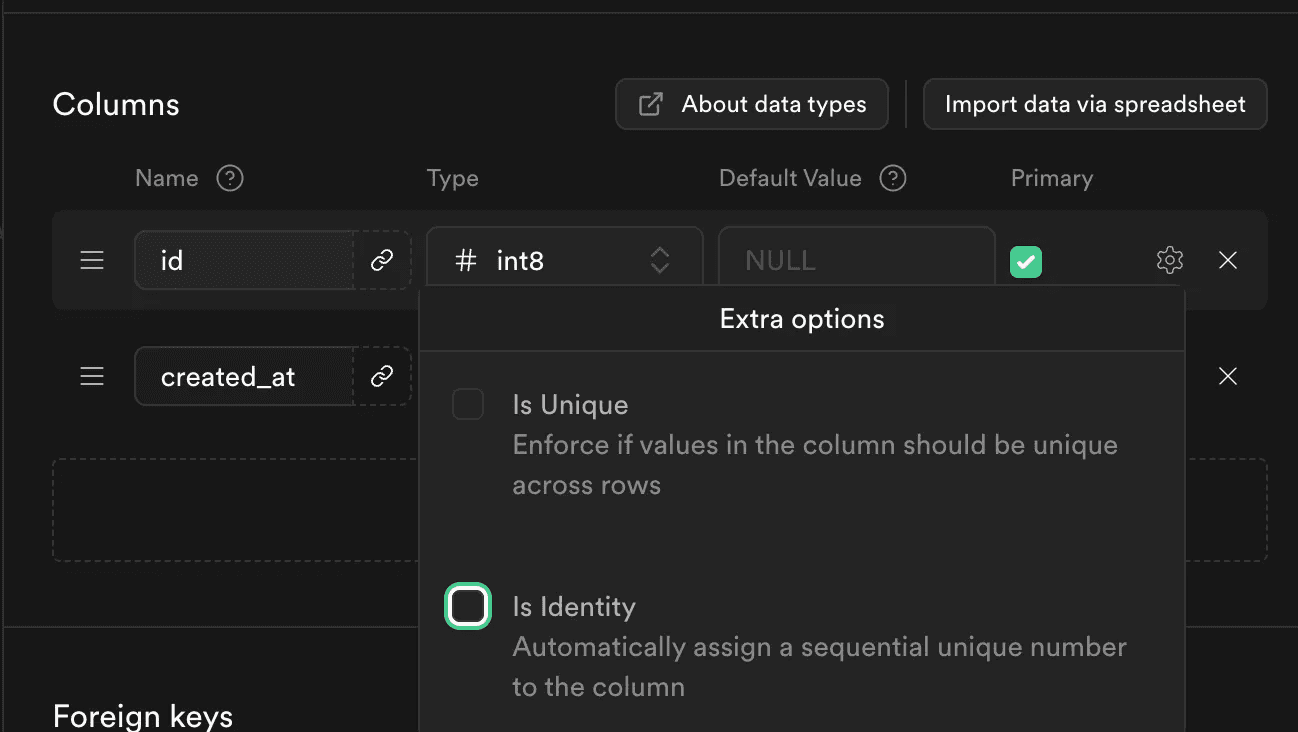
Let’s move to the next step once your done setting up the outputs table.
Step 2: Setup database function for the cron job
Now to setup the database function for ingesting the batch_id from the batch_processing_detail tables , you can find this in part 2 .
In the SQL editor run this code and your database function would be created.
CREATE OR REPLACE FUNCTION check_batch_processing_completion()
RETURNS void AS $$
DECLARE
    row_record RECORD;
    api_response JSON;
    row_json JSON;
    batch_status text;
BEGIN
    FOR row_record IN SELECT * FROM your_table_name WHERE batch_job_status = FALSE
    LOOP
        -- Make an API call to the external endpoint
        -- Replace 'your_api_endpoint' with the actual API endpoint
        -- and 'column_to_send' with the column name to send to the API
        row_json := json_build_object('batch_job_id', row_record.batch_job_id);
        -- SELECT response INTO api_response
        PERFORM http_post(
            '',
            row_json::text,
            'application/json'
        );

        batch_status := api_response->>'batch_job_status';
        -- Update the column_to_check with the API response
        UPDATE your_table_name
        SET batch_job_status = CASE
            WHEN batch_status = 'completed' THEN TRUE
            WHEN batch_status = 'notcompleted' THEN FALSE
            ELSE batch_job_status  -- Keep existing value if response is invalid
        END
        WHERE id = row_record.id;
    END LOOP;
END;
$$ LANGUAGE plpgsql;
Replace your_table_name with the table name you have created in supabase. How above code operates is it goes to the table where I have stored the batch id’s for the batch job I have created in openai. I pass this batch id pass to the API and utilise this api to check if batch job is completed or not pushes the data into new table having outputs .
Step 3 : Setup database function for the cron job
SELECT cron.schedule('0 */2 * * *', 'SELECT check_batch_processing_completion();');
Now this cron job is setup which will run the database funciton for every 2 hrs .
Step 4 : Setting up the FastAPI code for saving the outputs to the db
from fastapi import FastAPI, Request
from supabase import create_client, Client
import json
import uvicorn
from typing import Dict, List, Optional
import os
from dotenv import load_load_dotenv

# Load environment variables
load_dotenv()

# Initialize FastAPI app
app = FastAPI()

# Initialize Supabase client
supabase: Client = create_client(
    supabase_url=os.getenv("SUPABASE_URL"),
    supabase_key=os.getenv("SUPABASE_KEY")
)

# Initialize your open client
client = Client(api_key=os.getenv('OPENAI_API_KEY'),organization=os.getenv('ORG_ID'))

@app.post("/test/batch_processing_result")
async def batch_processing_result(request: Request, background_tasks: BackgroundTasks):
    body = await request.json()
    batch_id = body.get('batch_job_id')
    batch_job = client.batches.retrieve(batch_id)
    # while batch_job.status == 'in_progress':
    batch_job = client.batches.retrieve(batch_id)
    print(batch_job.status)
    # Add the processing task to background tasks
    if batch_job.status == 'completed':
        background_tasks.add_task(process_batch_data, batch_id)
        return {"batch_job_status":'completed'}

    # Immediately return success response
    return {'batch_job_status':'notcompleted'}


async def process_batch_data(batch_id: str):
    try:
        batch_job = client.batches.retrieve(batch_id)
        if batch_job.status == 'completed':
            result_file_id = batch_job.output_file_id
            result = client.files.content(result_file_id).content
            json_str = result.decode('utf-8')
            json_lines = json_str.splitlines()

            res = []
            for line in json_lines:
                if line.strip():
                    try:
                        json_dict = json.loads(line)
                        res.append(json_dict)
                    except json.JSONDecodeError as e:
                        print(f"Error decoding JSON on line: {line}\nError: {e}")

            for resp in res:
                id = resp.get('custom_id')
                res_id = id.split('-')[1]
                output = json.loads(resp.get('response').get('body').get('choices')[0].get('message').get('content'))

                categories = str(output.get('categories'))
                summary = str(output.get('summary'))

                supabase_resp = supabase.table("imdb_dataset").select("Description").eq("imdb_id", res_id).execute()
                description = supabase_resp.data[0].get('Description')

                insert_response = (
                    supabase.table("imdb_outputs")
                    .insert({
                        "id": res_id,
                        "description": description,
                        'categories': categories,
                        'summary': summary
                    })
                    .execute()
                )
                print(f"Inserted data for ID: {res_id}")

    except Exception as e:
        print(f"Error in background processing: {str(e)}")
        # You might want to log this error or handle it in some way

if __name__ == "__main__":
    uvicorn.run(
        "main:app",
        host="0.0.0.0",
        port=8000,
        reload=True  # Enable auto-reload during development
    )
Utilise the above code to fetch all the data from the batch , that is completed and insert the data to the relevant column into the supabase database.
@app.post("/test/batch_processing_result")
async def batch_processing_result(request: Request, background_tasks: BackgroundTasks):
    body = await request.json()
    batch_id = body.get('batch_job_id')
    batch_job = client.batches.retrieve(batch_id)
    # while batch_job.status == 'in_progress':
    batch_job = client.batches.retrieve(batch_id)
    print(batch_job.status)
    # Add the processing task to background tasks
    if batch_job.status == 'completed':
        background_tasks.add_task(process_batch_data, batch_id)
        return {"batch_job_status":'completed'}

    # Immediately return success response
    return {'batch_job_status':'notcompleted'}
Above snippet actually checks if the batch process is compeleted or not and and then adds the task of inserting the data into the database to a background task , so that api response should not be delayed in the database function and does not face a timeout .
async def process_batch_data(batch_id: str):
    try:
        batch_job = client.batches.retrieve(batch_id)
        if batch_job.status == 'completed':
            result_file_id = batch_job.output_file_id
            result = client.files.content(result_file_id).content
            json_str = result.decode('utf-8')
            json_lines = json_str.splitlines()

            res = []
            for line in json_lines:
                if line.strip():
                    try:
                        json_dict = json.loads(line)
                        res.append(json_dict)
                    except json.JSONDecodeError as e:
                        print(f"Error decoding JSON on line: {line}\nError: {e}")

            for resp in res:
                id = resp.get('custom_id')
                res_id = id.split('-')[1]
                output = json.loads(resp.get('response').get('body').get('choices')[0].get('message').get('content'))

                categories = str(output.get('categories'))
                summary = str(output.get('summary'))

                supabase_resp = supabase.table("imdb_dataset").select("Description").eq("imdb_id", res_id).execute()
                description = supabase_resp.data[0].get('Description')

                insert_response = (
                    supabase.table("imdb_outputs")
                    .insert({
                        "id": res_id,
                        "description": description,
                        'categories': categories,
                        'summary': summary
                    })
                    .execute()
                )
                print(f"Inserted data for ID: {res_id}")

    except Exception as e:
        print(f"Error in background processing: {str(e)}")
        # You might want to log this error or handle it in some way
Above code snippet fetches the output of the batch , loads that into the json in memory and parses the json and extracts relevant output from the batch output json and inserts the data into the output supabase table.
Conclusion
This completed the series , and tells you exactly how can setup a automated batch processing pipeline utilising open ai API , but the process sort of remains the same , where for any database you have to set triggers , to check if you have significant number of rows , pass that data to an API endpoint which would create a batch job and save the batch_job_id into our database tables as logs . Now you can create a cron job that would check for you for regular intervals if the batch processing is completed or not .
Stay tuned ! For more such interesting content .
The 🤫 hussh magazine
Written by Omkar Malpure, and built to read beautifully here — and to travel to 🤫 One on your phone, your glasses, and visionOS, as one immersive magazine you own.